Inkpenny

The Household Money Sheet · for Google Sheets

Know exactly where every paycheck goes, and the month your debt ends.

The Household Money Sheet on two phones: the Paycheck Plan with the amount you can spend until payday, and the Debt Payoff tab with the debt-free month, next to a sticky note with the amount a day

One Google Sheet that plans each paycheck before it lands. Tell it three things, and it gives you one number to look at until payday.

  • One number until payday. What you can spend until the next paycheck, and what that comes to a day. No more math in your head at the checkout.
  • The rent paycheck stops being the broke one. When the rent or the car payment lands on the next paycheck, this one keeps part of its money for it, and the plan tells you how much.
  • The month your debt ends. Every card and loan in the order you choose, with a payment that doesn't shrink when the bank lowers your minimum.
  • Yours, paid once. No subscription and no bank login: your numbers stay in your own Google account.

Paycheck-First, in three parts:

  • Every paycheck planned
  • One number until payday
  • The month your debt ends
$27todayTotal value $67

14-day money-back guarantee. If it isn't for you, write to us and you get your money back. No forms.

Works in Google Sheets (not Excel) on any device. One-time purchase. No bank login.

Where it goes

You're not bad with money. Your budget was built for a perfect month, and you've never had one.

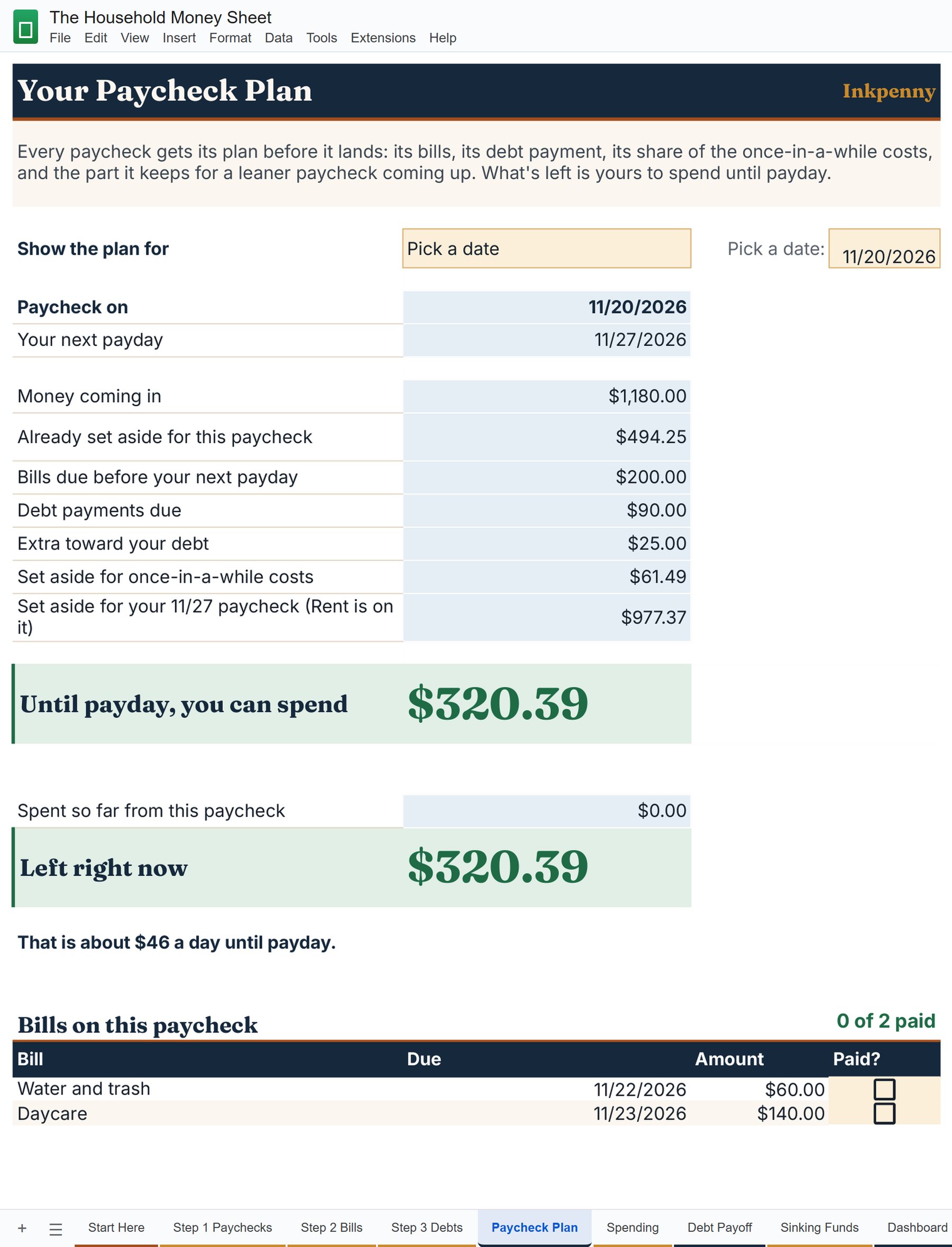
The Paycheck Plan tab of The Household Money Sheet with the example family: money coming in, bills, debt payments, set-asides, and the amount left until payday

On paper the month works. The budget says there should be $500 left over. Then you open the bank app on the Tuesday after payday, and it's just gone. Two weeks of tracking, and the spreadsheet goes quiet until January.

So the card covers the gap. The light bill goes on it, then the car insurance that comes twice a year, then Christmas, which you're still paying off in April. The minimum on the statement goes down a little every month, and somehow the balance doesn't.

And you start to think it's you. That someone more disciplined would have made the budget stick. Skip the coffee, try another app, start over in January.

It was never you. Your money doesn't come in months. It comes in paychecks: seven out of ten private businesses in the US pay every week or every two weeks (U.S. Bureau of Labor Statistics). A monthly budget adds the paychecks into one line and the bills into one total, and on paper it balances. In real life the rent comes out of one paycheck, and the paycheck before it gets spent as if the rent didn't exist.

And the debt runs on the bank's clock. The minimum shrinks as the balance shrinks, so paying the minimum means paying a little less every month, for longer. There's a box on every credit card statement that says how long. Go look at yours.

So the fix happens before the money lands. Each paycheck gets its own plan: the bills due before the next one, its share of the costs that come once a year, a debt payment that stays put, and one number for what's left. We call it Paycheck-First, and we built it into one Google Sheet.

What changes

Six things change the day you plan paycheck first.

Every paycheck gets its plan before it lands
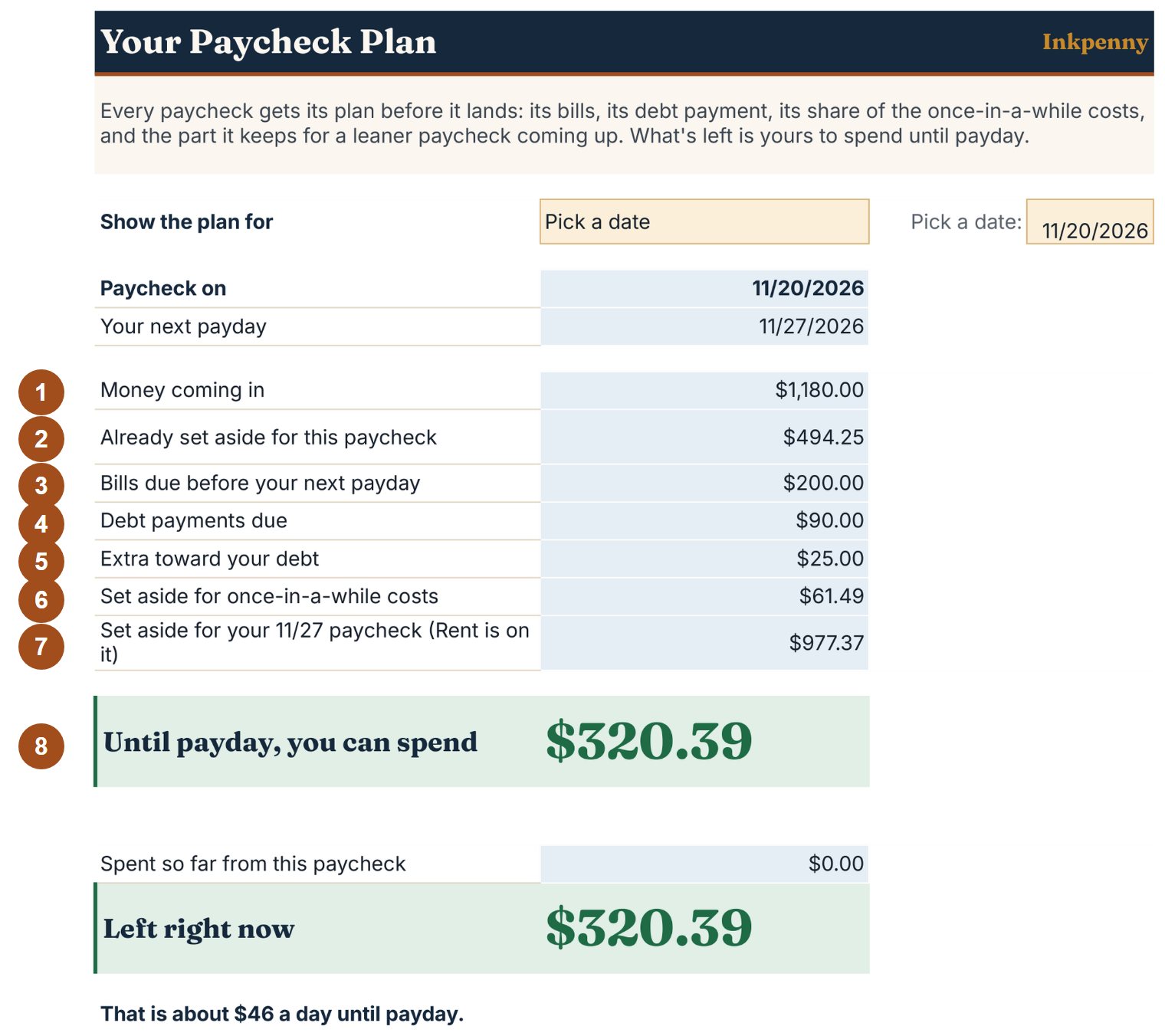
The Paycheck Plan of the example family with its parts numbered from 1 to 8: money coming in, already set aside, bills, debt payments, extra toward debt, once-in-a-while costs, set aside for the next paycheck, and the amount until payday
The Paycheck Plan of the example family, with its parts numbered. Tap to see it full size.

Pick a paycheck, and the sheet lays out its plan line by line, in the same order every time:

  1. Money coming in: the paycheck, and any other paycheck that lands the same day.
  2. Already set aside for this paycheck: what the paycheck before it kept for this one.
  3. Bills due before your next payday: every bill that comes due before the next paycheck lands, so none of them catches you short.
  4. Debt payments due: the minimums whose due dates fall before the next payday.
  5. Extra toward your debt: the extra you choose, the same on every paycheck.
  6. Set aside for once-in-a-while costs: this paycheck's share of the car insurance, the registration, Christmas and the cushion.
  7. Set aside for your next paycheck: when the rent or the car payment lands on the next one, this one keeps part of its money for it, and the plan names the bill.
  8. Until payday, you can spend: the one number to look at, and what it comes to a day.

This is the plan the sheet shows the example family for their paycheck of 11/20. Their rent is due on the next one, so this paycheck keeps $977.37 for it. Nobody had to remember.

One number to look at until payday

The Paycheck Plan on a phone: until payday, you can spend $320.39, about $46 a day

The big green number is what's left after everything above it. Write down what you spend and the line under it, Left right now, goes down with you. Under it the sheet tells you what that comes to a day: for the example family's plan, about $46 a day until payday.

Pizza on a Wednesday? You look at the number, not at the bank app. One number, so you can stop doing math in your head.

The rent paycheck stops being the broke one

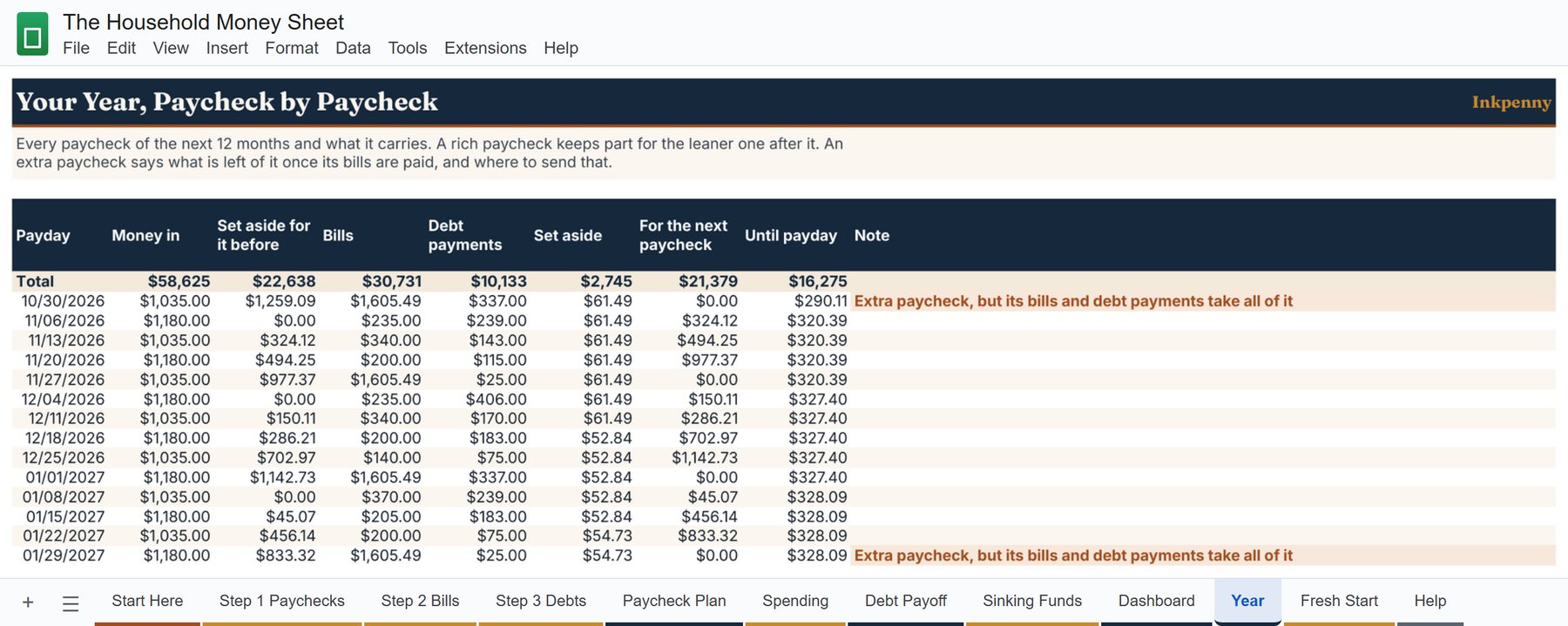
The Year tab: every paycheck of the next months with money in, set aside for it before, bills, debt payments, set aside, for the next paycheck, and until payday

Most months have a fat paycheck and one that has to carry the rent. A monthly budget adds them together and calls it a month, so the fat one gets spent and the rent one comes up short.

The sheet looks up to four weeks ahead. When the rent, the car payment or another big bill lands on the next paycheck, this one keeps part of its money for it, so the paychecks in between leave about the same amount each day. If one would still come up short, the plan names it and the amount while there's time to plan for it.

The Year tab shows it for every paycheck of the next twelve months: what was set aside for it before, what it keeps for the next one, and what's left.

The costs that come once a year finally get a line

Set aside from this paycheck: Christmas, Birthdays, Emergency cushion, Back to school, Car insurance, Car registration, and the next paycheck
What one paycheck of the example family sets aside, and what for.

Car insurance twice a year, the registration, birthdays, back to school, Christmas: the costs that "come out of nowhere" every single year. Write each one once, with the amount and the date. Every paycheck from now until then sets aside its share, so the money is there on the day and the card stays out of it.

Paid every two weeks? Twice a year a month brings a third paycheck. The sheet marks those months, and the Year tab tells you what that paycheck really carries (often the rent of the 1st) and where to send what's left of it: to a debt, or to a sinking fund.

The month your debt ends, and a payment that doesn't shrink

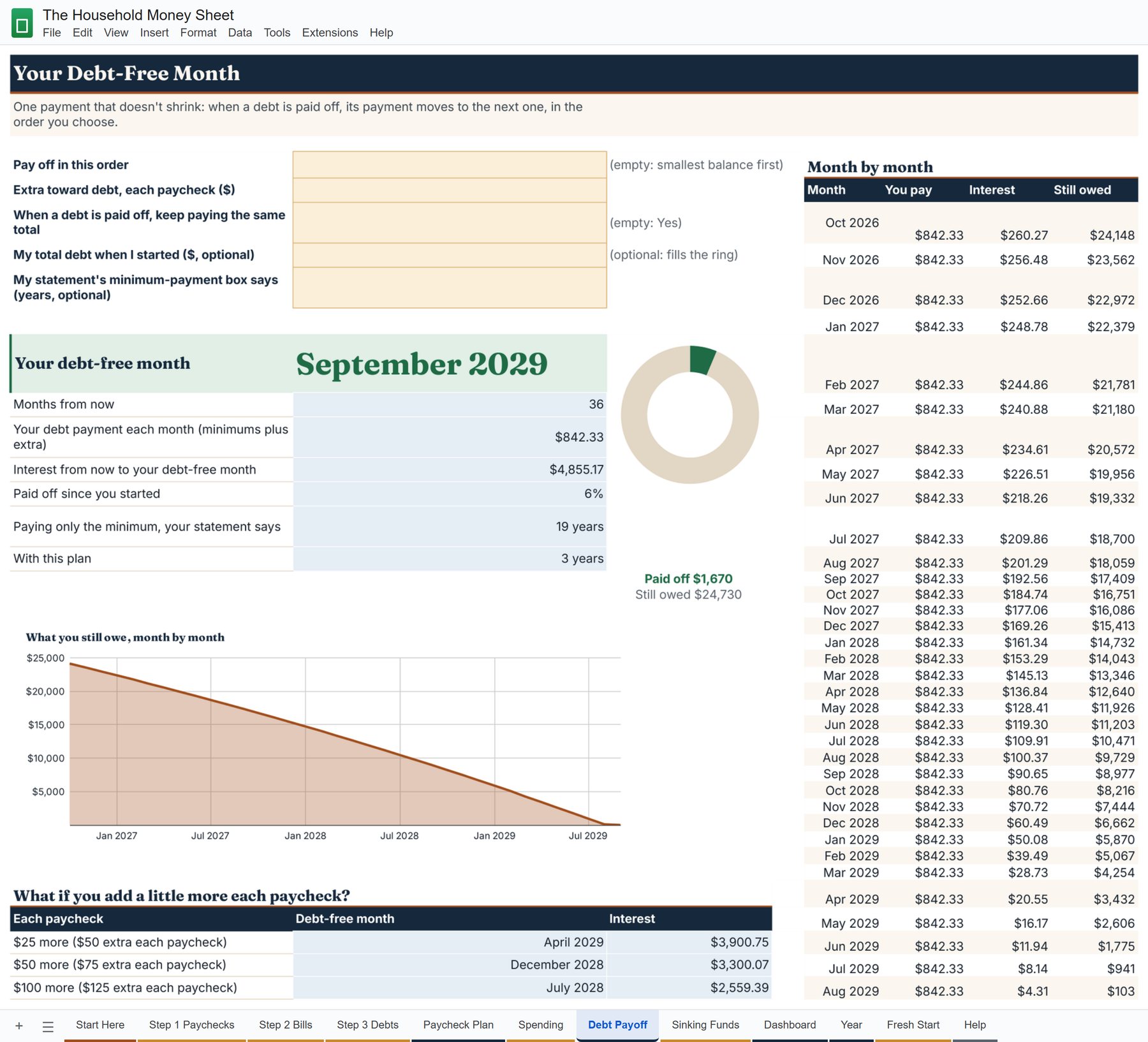
The Debt Payoff tab of the example family: your debt-free month, September 2029, the monthly payment, the interest, and what if you add a little more each paycheck

Type every card and loan once, from your latest statements: the balance, the minimum, the rate and the day it's due. One row for each, with room for 100 of them.

Pick the order (smallest balance first, highest rate first, or your own) and the sheet shows you the month you're done. When a debt is paid off, its payment moves to the next one, so the total you pay stays the same instead of shrinking with the bank's minimum.

Next to it, write the years your own statement prints in its minimum-payment box: your calendar next to the bank's, with your own numbers. And three lines show you the month you'd get there with $25, $50 or $100 more a paycheck.

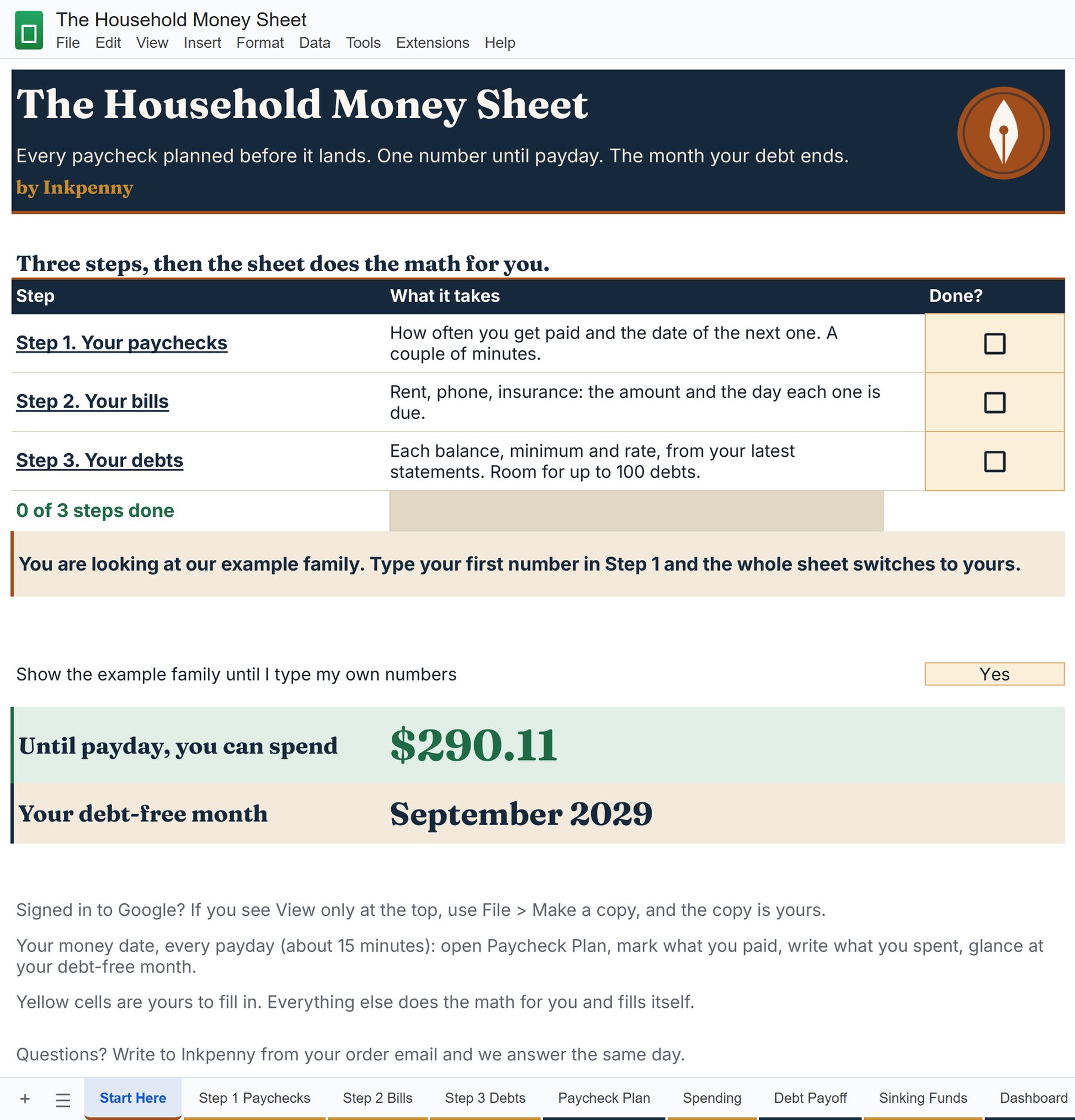
Three steps, then the sheet does the math

The three steps of the sheet with the example family typed in: paychecks, bills with the paycheck each one comes out of, and debts with the month each one is paid off

Step 1, your paychecks: how often each one comes and the date of the next one. Up to four paychecks in your home, paid every week, every two weeks, twice a month, once a month, or different every time.

Step 2, your bills: the amount and the day each one is due. Step 3, your debts. That's all the typing there is.

You type only in the yellow cells; everything else does the math and fills itself. And until you type your first number, an example family fills the sheet, so you see it working the moment you open it.

Look inside

See the sheet before you spend a dollar.

These are tabs of the sheet with the example family in it: the family that fills it until you type your first number. Swipe through them and tap one to open it full size.

The Start Here tab
Start Here: the three steps, your number until payday and your debt-free month, on the first tab.
The Paycheck Plan tab
Paycheck Plan: everything one paycheck carries, and what's left until payday.
The Debt Payoff tab
Debt Payoff: the month you're done, the what-ifs, and the plan month by month.
The Year tab
Year: every paycheck of the next twelve months, and what each one keeps for the next.

Swipe for more · tap a tab to open it full size

Included with the sheet

For the pencil, and for every payday after the first.

Printable Plan Pages

Printable Plan Pages

Rather plan with a pencil? The same plan on paper: a page for each paycheck, the bills list, the debt list and the sinking funds, each with an example filled in by hand. Print as many as you like, for the fridge or the binder. With The Friday Fifteen: the fifteen minutes that keep the plan alive every payday.

Sold alone for $14 · Included with the sheet

How it works

From this page to your first paycheck plan, in three steps.

  1. Make your copy

    Minutes after you order, your link arrives by email. Sign in to Google (a free account works), tap Make my copy, and the sheet is in your own Google Drive.

  2. Answer three questions

    When you get paid, when your bills are due, and what you owe. The example family steps aside the moment you type your first number.

  3. Look at one number

    Open the Paycheck Plan on payday. The bills, the set-asides and the debt payment are already there, and one number tells you what's left until the next paycheck.

Built so it doesn't break

A sheet you can't break by typing in it.

Yellow cells for you, the rest does the math

You only type in the yellow cells. Every calculation lives in the cells around them and in tabs you never touch, so pasting a number never breaks a formula.

Checked against worked examples

The math is checked against a separate calculation, household by household: paid every week, every two weeks, twice a month, once a month and irregularly.

No scripts, no bank login

Nothing asks for permission to run on your account, and nothing connects to your bank. It's plain Google Sheets, with nothing to install.

Big type, and we never see your numbers

The key numbers are large and the text is dark on light. Your copy lives in your own Google account: we send you the link to make it, and what you type stays with you.

Plan every paycheck before it lands, for $27.

One payment and it's yours: a Google Sheet that lives in your own Google account, on your computer, tablet or phone. Your link to make your copy arrives minutes after you order, and you can make a fresh copy any time from your library. It works in Google Sheets with a free Google account. It is not an Excel file.

$27todayTotal value $67
Add to your order (optional, only in this cart)

14-day money-back guarantee. If it isn't for you, write to us and you get your money back. No forms.

Pay once. Nothing renews, nothing to cancel. Secure checkout by Stripe. Refund policy.

Run one full paycheck through it. If it isn't for you, you get your money back.

Set it up and run one full paycheck through it. If it isn't for you, write to [email protected] within 14 days of your order and you get your money back. No forms, no questions about why.

Questions

Fair questions, straight answers.

There are free budget templates. Why pay for this?

A free template gives you a blank grid and a monthly total. This one plans every paycheck on its own, keeps part of a rich paycheck for the rent paycheck after it, splits the once-a-year costs across your paychecks, and gives you the month your debt ends. It comes built, checked against worked examples, and explained step by step. And if it isn't for you, you get your money back.

I already use a budgeting app.

Then you know the trade: easy to keep up with, but a monthly fee, a bank login, and a price that can go up. This is one payment, no subscription, nothing connected to your bank, and your numbers stay in your own Google account.

I'm not a spreadsheet person. What if I break something?

You type only in the yellow cells; the others do the math and refill themselves. Pasting into a yellow cell never touches a formula, Undo fixes a slip, and you can make a fresh copy from your library any time. Until you type your first number an example family fills the sheet, so you see how it works before you start.

Does it work with Excel?

No, and you won't need it. It's made for Google Sheets, which is free on any computer, tablet or phone with a free Google account. It uses Google Sheets formulas that Excel doesn't run the same way, so downloading it to Excel isn't supported.

Does it work on my phone?

It's a Google Sheet, so it opens in the free Google Sheets app. The three steps are easiest on a computer or a tablet the first time; after that the app is all you need to check your number and write down what you spend.

Can you see my numbers?

No. Your copy lives in your own Google account, and we never ask for access to it. Nothing connects to your bank either.

I'm paid weekly, by the hour, or differently every time.

It handles pay every week, every two weeks, twice a month and once a month, up to four paychecks in your home. If your pay changes every time (tips, shifts, gigs), pick Irregular and write each deposit when it lands: that deposit gets its own plan.

Does it connect to my bank?

No. Nobody gets your bank password. You type your numbers once, and on payday you mark what you paid.

Can I share it with my partner?

Yes. Tap Share in Google Sheets, add their email and pick Editor: you both see the same plan.

Is it only for people with money to spare?

No. The example family takes home about $4,800 a month in two paychecks every two weeks, and has six debts, a hospital bill among them. The sheet works with whatever comes in, and tells you ahead of time when a paycheck will come up short.

How do I get it? Do I need a Google account?

Minutes after you order, an email brings your link, and it's in your library too. You need a Google account, and a free one works. Sign in, tap Make my copy, and the sheet is yours.

Is this a subscription?

No. One payment, once. Nothing renews, and every update is yours free in your library.

What if it's not for me?

Then it costs you nothing. Run one full paycheck through it. If it isn't for you, write to [email protected] within 14 days of your order and you get your money back. No forms, no questions about why. Full policy on the refund page.

Is this financial advice?

No. It's an educational tool that does the math on the numbers you type in. For advice on your own situation, talk to a qualified professional.

Two ways your next paycheck can go.

You can do it the way you always have: the money lands, the bills come out when they come out, and on Tuesday you open the bank app and wonder where it went.

Or you can open one sheet on payday and find the plan already there: the bills on this paycheck, its share of the once-a-year costs, the debt payment, the part it keeps for the rent paycheck, and one number until payday.

Run one full paycheck through it. If it isn't for you, write to us within 14 days and you get your money back. Press the button, and your copy is one tap away.

$27todayTotal value $67

14-day money-back guarantee. If it isn't for you, write to us and you get your money back. No forms.

$27$6714-day money-back guarantee